
 ETLBox
Replacing SSIS with a C# data flow
September 21, 2026 by Andreas Lennartz11 minutes
SSIS is still supported and still fast, but it is no longer where Microsoft invests. Graphical packages age badly; Azure Data Factory is the official cloud successor, yet it struggles with the control-flow and data-flow complexity SSIS teams actually run. This article shows how to keep streaming performance and SSIS-style components — in C# with ETLBox.
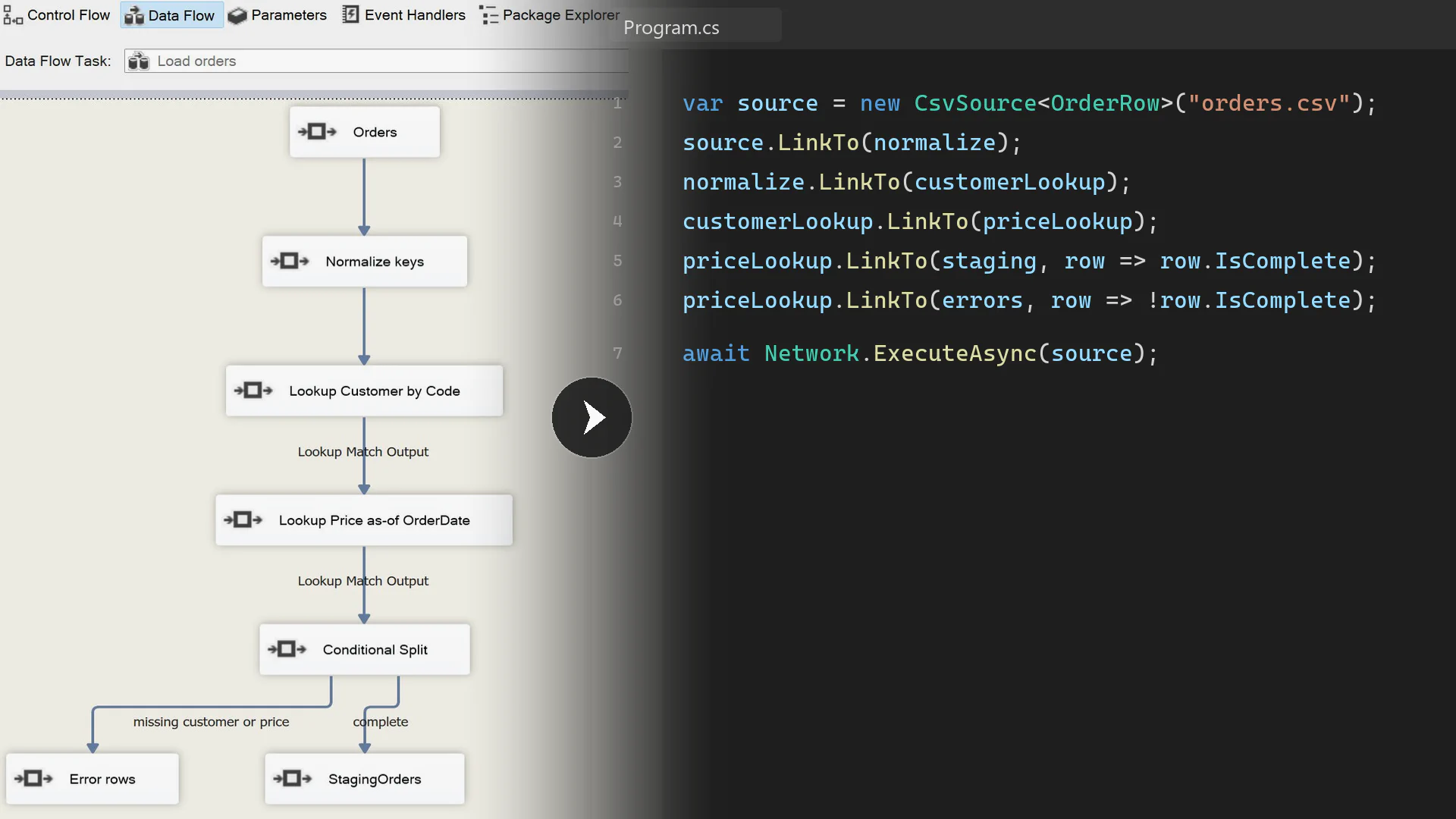
SSIS is not dead. It has stopped moving.
A lot of production ETL still lives in SQL Server Integration Services. Those packages are fast, operators know how to restart them, and Microsoft still ships and supports SSIS with current SQL Server versions. None of that is in dispute.
What has changed is where the product goes next. New SSIS features have effectively stopped. Microsoft’s cloud ETL investment sits in Azure Data Factory, Synapse pipelines, and Fabric. Teams stay on SSIS because it is familiar and because it still moves data quickly — not because there is a roadmap that will make the next decade of packages easier to own.
That is a comfortable place until it is not. The expensive moment is the one where a platform decision, a hiring constraint, or a cloud migration forces the move, and the only packages you have are designer canvases nobody wants to reopen.
Why UI-driven packages get so hard to change
SSIS is popular for good reasons. Control Flow and Data Flow are easy to explain, the engine is fast, and Lookup, Conditional Split, Merge Join, and Multicast are still how a lot of people think about ETL.
The designer does not age as well. After a few years you have copied Data Flows, Script Components that nobody runs in a test, and a pile of configurations and expressions. A .dtsx diff is mostly XML and control positions. Adding one extra Lookup path means rearranging the canvas and hoping the metadata still matches. So the package stays as it is — and that is usually why the migration never starts.
Azure Data Factory is the official successor. It is not the better designer.
For cloud-native, mostly linear pipelines, Azure Data Factory is a reasonable default. Mapping Data Flows, linked services, and triggers fit that shape. That is not the shape of most long-lived SSIS estates.
What SSIS teams actually run is dense: Execute SQL around a Data Flow, branches, lookups with no-match outputs, row redirection, and the occasional Script Component that exists because the toolbox cannot express the rule. Mapping Data Flows make that awkward. The UI is heavier, debugging is slower, the expression language is not C#, and the unit of reuse is still a canvas. The SSIS Integration Runtime is a bridge so existing packages can keep running in Azure. It is not a destination.
The useful conclusion is not “ADF cannot do complex work.” It is that swapping one designer for another does not fix maintainability, testability, or version control. If the problem is the graphical data flow, the exit is code.
Same mental model, different medium
A code-first pipeline does not throw away SSIS. It keeps the split SSIS already taught:
- Control Flow is everything that happens before and after the stream: create tables, truncate staging, run SQL, write counts.
- Data Flow is source → transform → destination, row by row, with a second path for rows that should not land in the target.
In ETLBox that is CreateTableTask, TruncateTableTask, and SqlTask around a linked network of data-flow components, started with Network.Execute. The components have the same jobs as the SSIS toolbox. The difference is that the package is C#: Git diffs, unit tests, and CI/CD come for free.
ETLBox is a streaming ETL library for .NET. It is built for the workloads SSIS was good at — large files, lookups, branches, bulk loads — without a designer. You can learn more at ETLBox.net.
Here is the vocabulary mapping for the example below, plus the other components SSIS packages use every day:
| SSIS | ETLBox |
|---|---|
| Execute SQL / Truncate Table | SqlTask, TruncateTableTask |
| Flat File Source | CsvSource |
| Derived Column / Script Component | RowTransformation |
| Lookup | LookupTransformation |
| Conditional Split | LinkTo(..., predicate) or ConditionalSplit |
| OLE DB Destination | DbDestination |
| Error output | a second LinkTo predicate, or LinkErrorTo |
| ForEach File (not used in this sample) | a C# foreach over files or HasNextUri on a source |
| Aggregate / Sort / Pivot / Merge Join / Multicast | Aggregation, Sort, Pivot, MergeJoin, Multicast |
This is not an automated .dtsx importer, and it is not a claim that every SSIS toolbox item (Fuzzy Lookup, DQS, the SCD wizard) has a one-click twin. It is the set of components production packages actually spend their time in — expressed as code, with the same streaming execution model.
A nightly partner-order import
Consider a package most SSIS shops have in some form. A partner drops an order CSV. You stage clean rows, reject the rest, and merge staging into Orders.
On the Control Flow tab it would look like this: create tables if they are missing, truncate staging, run the Data Flow, MERGE staging into Orders, write row counts.
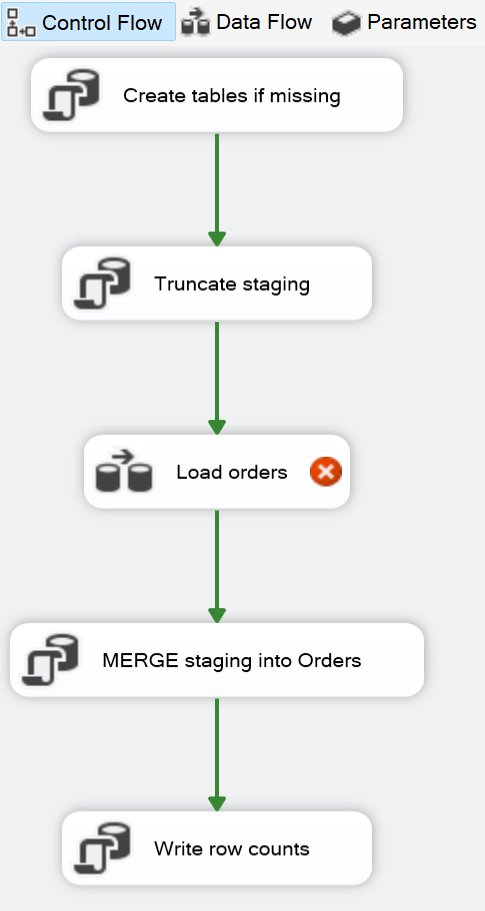
In ETLBox that is the same vertical sequence:
CreateTable (if missing)
        ↓
Truncate staging
        ↓
Data Flow: load orders
        ↓
SqlTask: MERGE staging into Orders
        ↓
SqlTask: write row counts
The Data Flow is ordinary until the second lookup. Flat File Source, a Derived Column to normalize keys, a Lookup on Customers by code, then a lookup against a price history. Valid rows go to staging. Missing customers or missing prices go to an error CSV.
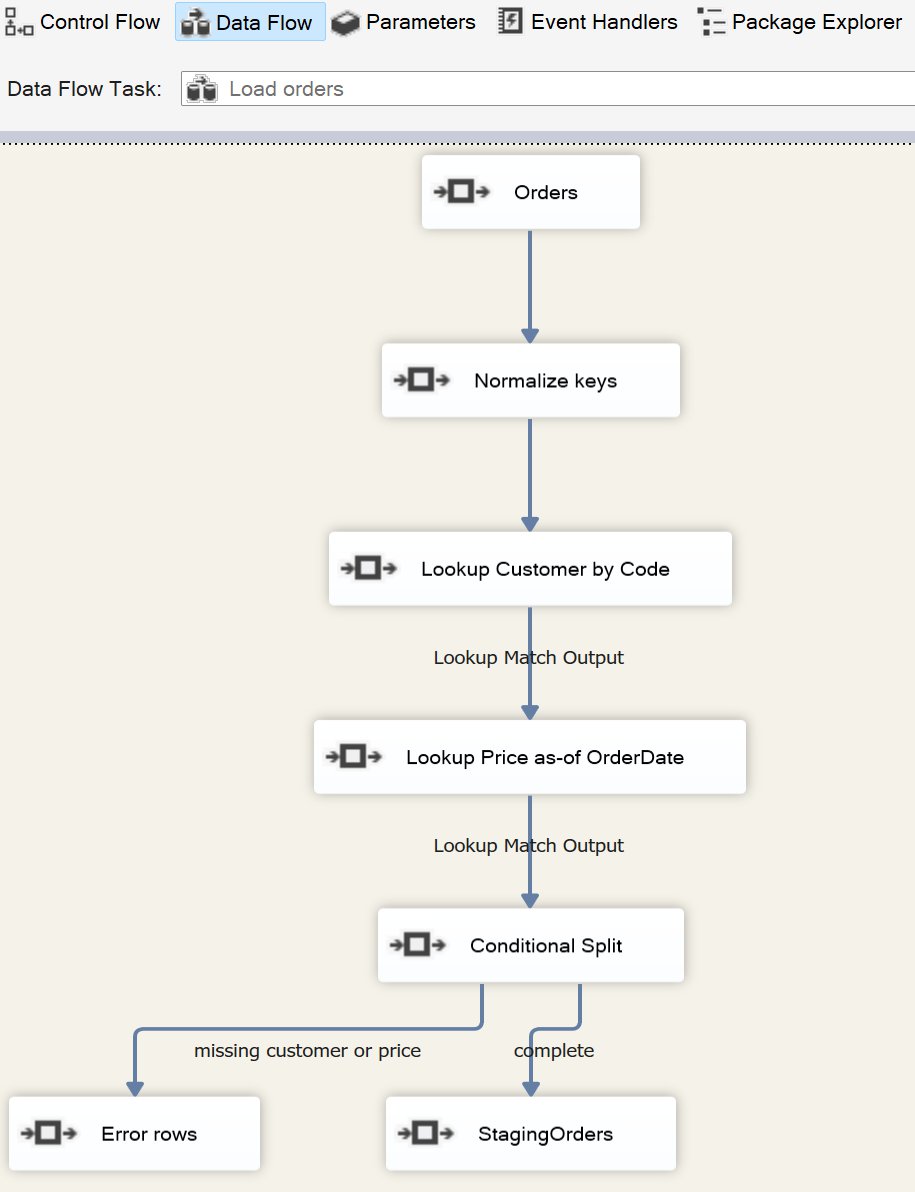
Mapped to ETLBox components:
CsvSource (orders.csv)
        ↓
RowTransformation (normalize keys)
        ↓
Lookup Customer by Code
        ↓
Lookup Price as-of OrderDate
        ↓
        ├─ complete → DbDestination (StagingOrders)
        └─ missing customer or price → CsvDestination (errors.csv)
Sample data
A partner file, a customer table, and a price history. WIDGET-A has two validity windows, so a Lookup on SKU alone is not enough.
OrderId,OrderDate,CustomerCode,ProductSku,Quantity
1001,2026-03-15,ACME,WIDGET-A,10
1002,2026-03-15,ACME,WIDGET-B,2
1003,2026-03-16,UNKNOWN,WIDGET-A,1
1004,2026-01-02,BETA,WIDGET-A,5
1005,2024-06-01,BETA,WIDGET-A,3| Id | Code | Name |
|---|---|---|
| 1 | ACME | Acme Corp |
| 2 | BETA | Beta GmbH |
| Sku | Price | ValidFrom | ValidTo |
|---|---|---|---|
| WIDGET-A | 9.99 | 2025-01-01 | 2026-02-28 |
| WIDGET-A | 12.50 | 2026-03-01 | 9999-12-31 |
| WIDGET-B | 4.00 | 2025-01-01 | 9999-12-31 |
Control Flow: prepare, then truncate staging
The connection string is the usual local SQL Server demo catalog. Control Flow tasks create the tables if they are missing. Truncating staging is the nightly reset — the same Execute SQL Task you would put at the top of the package.
string sqlConnectionString =
    @"Data Source=localhost;User Id=sa;Password=YourStrong@Passw0rd;Initial Catalog=demo;TrustServerCertificate=true";

var connectionManager = new SqlConnectionManager(sqlConnectionString);

CreateTableTask.CreateIfNotExists(connectionManager, "StagingOrders", orderColumns);
CreateTableTask.CreateIfNotExists(connectionManager, "Orders", orderColumns);
TruncateTableTask.Truncate(connectionManager, "StagingOrders");
orderColumns is the shared table definition for staging and the target — the complete listing at the end of the article includes it. Customers and ProductPrices are reference tables. The GitHub demo reseeds them so you can run the sample repeatedly. In production you would load those on their own schedule and leave them alone here.
POCOs instead of metadata on the canvas
The incoming file, the customer lookup, and the price list are ordinary C# classes. [MatchColumn] / [RetrieveColumn] are the SSIS Lookup mappings. CustomerCode is needed for the match but is not a column on StagingOrders, so it is ignored on write.
public class OrderRow
{
    public int OrderId { get; set; }
    public DateTime OrderDate { get; set; }

    [DbColumnMap(IgnoreColumn = true)]
    public string CustomerCode { get; set; }

    public int? CustomerId { get; set; }
    public string CustomerName { get; set; }
    public string ProductSku { get; set; }
    public int Quantity { get; set; }
    public decimal? UnitPrice { get; set; }

    public bool IsComplete => CustomerId != null && UnitPrice != null;
}

public class Customer
{
    [MatchColumn(nameof(OrderRow.CustomerCode))]
    public string Code { get; set; }

    [RetrieveColumn(nameof(OrderRow.CustomerId))]
    public int Id { get; set; }

    [RetrieveColumn(nameof(OrderRow.CustomerName))]
    public string Name { get; set; }
}

public class ProductPrice
{
    public string Sku { get; set; }
    public decimal Price { get; set; }
    public DateTime ValidFrom { get; set; }
    public DateTime ValidTo { get; set; }
}
Data Flow: normalize, lookup, split
The idea is the same as in SSIS: read the file, clean the keys, look up the customer, then find the price that was valid on the order date. Rows that have both go to staging. The rest stay readable order rows in errors.csv — not the stripped SSIS error output.
The customer lookup is the equality match you already know. The price lookup is the one the SSIS toolbox does not have: keep the price list in cache and pick the row whose date range covers OrderDate. In SSIS that usually becomes a Script Component or an OLE DB Command per row.
var source = new CsvSource<OrderRow>("orders.csv");

var normalize = new RowTransformation<OrderRow>(row => {
    row.CustomerCode = row.CustomerCode?.Trim().ToUpperInvariant();
    row.ProductSku = row.ProductSku?.Trim().ToUpperInvariant();
    return row;
});

var customerLookup = new LookupTransformation<OrderRow, Customer> {
    Source = new DbSource<Customer>(connectionManager, "Customers")
};

var priceLookup = new LookupTransformation<OrderRow, ProductPrice> {
    Source = new DbSource<ProductPrice>(connectionManager, "ProductPrices"),
    PermitMultipleEntriesPerKey = true,
    ApplyRetrievedCacheToInput = (order, cache) => {
        var price = cache.List.FirstOrDefault(p =>
            p.Sku == order.ProductSku
            && order.OrderDate >= p.ValidFrom
            && order.OrderDate <= p.ValidTo);
        order.UnitPrice = price?.Price;
        return order;
    }
};

var staging = new DbDestination<OrderRow>(connectionManager, "StagingOrders");
var errors = new CsvDestination<OrderRow>("errors.csv");
Link the path like a Conditional Split, then run it. Complete rows to staging, everything else to the error file.
source.LinkTo(normalize);
normalize.LinkTo(customerLookup);
customerLookup.LinkTo(priceLookup);
priceLookup.LinkTo(staging, row => row.IsComplete);
priceLookup.LinkTo(errors, row => !row.IsComplete);

await Network.ExecuteAsync(source);
After the stream: MERGE and counts
The last two Control Flow tasks are SQL. Staging is bulk-loaded; a set-based MERGE applies it to Orders. Scalar queries print the audit trail.
SqlTask.ExecuteNonQuery(connectionManager, @"
    MERGE INTO Orders AS dest
    USING StagingOrders AS src
    ON dest.OrderId = src.OrderId
    WHEN MATCHED THEN
        UPDATE SET
            OrderDate = src.OrderDate,
            CustomerId = src.CustomerId,
            CustomerName = src.CustomerName,
            ProductSku = src.ProductSku,
            Quantity = src.Quantity,
            UnitPrice = src.UnitPrice
    WHEN NOT MATCHED THEN
        INSERT (OrderId, OrderDate, CustomerId, CustomerName, ProductSku, Quantity, UnitPrice)
        VALUES (src.OrderId, src.OrderDate, src.CustomerId, src.CustomerName, src.ProductSku, src.Quantity, src.UnitPrice);
");

int staged = SqlTask.ExecuteScalar<int>(connectionManager, "SELECT COUNT(*) FROM StagingOrders");
int loaded = SqlTask.ExecuteScalar<int>(connectionManager, "SELECT COUNT(*) FROM Orders");
Console.WriteLine($"Staged {staged} orders. Orders table now has {loaded} rows. Errors: {errors.ProgressCount}");

Console.WriteLine("Errors:");
Console.WriteLine(File.ReadAllText("errors.csv"));
Console.WriteLine("Press ENTER to exit.");
Console.ReadLine();
If you prefer a component to a SQL MERGE,
DbMerge does the same job inside the data flow.
Mastering Database Merging walks through the options.
Expected result
| OrderId | Outcome |
|---|---|
| 1001 | Staged — ACME, WIDGET-A at 12.50 |
| 1002 | Staged — ACME, WIDGET-B at 4.00 |
| 1003 | errors.csv — unknown customer |
| 1004 | Staged — BETA, WIDGET-A at 9.99 |
| 1005 | errors.csv — no price valid on 2024-06-01 |
Three rows in staging (and after the merge, in Orders). Two rows in the error file, still readable as orders, not as SSIS error-output stubs.
What you gain by writing it down
Changing the price rule is a Git diff on a predicate, not a layout change on a canvas. The same function can be covered by a test with five sample rows. The job runs locally, under an agent, in CI, or in a container — there is no Integration Runtime to babysit.
The Data Flow still streams. DbDestination writes batches. The expensive lookup table is cached once. That is the performance model SSIS was good at, without the designer that made the package expensive to own.
This article does not try to recreate a star schema or slowly changing dimensions. Those patterns are already covered in Building a Data Warehouse with ETLBox and in the data validation series. The point here is narrower: a Control Flow you would recognize from SSIS, a Data Flow that stays simple, and one rule the toolbox handles poorly.
Complete code overview
The runnable project, including table creation and seed data for Customers and ProductPrices, is on GitHub
.
using ETLBox;
using ETLBox.ControlFlow;
using ETLBox.Csv;
using ETLBox.DataFlow;
using ETLBox.SqlServer;
using SsisToCodeFirst;

string sqlConnectionString =
    @"Data Source=localhost;User Id=sa;Password=YourStrong@Passw0rd;Initial Catalog=demo;TrustServerCertificate=true";

var connectionManager = new SqlConnectionManager(sqlConnectionString);

PrepareDatabase(connectionManager);

TruncateTableTask.Truncate(connectionManager, "StagingOrders");

var source = new CsvSource<OrderRow>("orders.csv");

var normalize = new RowTransformation<OrderRow>(row => {
    row.CustomerCode = row.CustomerCode?.Trim().ToUpperInvariant();
    row.ProductSku = row.ProductSku?.Trim().ToUpperInvariant();
    return row;
});

var customerLookup = new LookupTransformation<OrderRow, Customer> {
    Source = new DbSource<Customer>(connectionManager, "Customers")
};

var priceLookup = new LookupTransformation<OrderRow, ProductPrice> {
    Source = new DbSource<ProductPrice>(connectionManager, "ProductPrices"),
    PermitMultipleEntriesPerKey = true,
    ApplyRetrievedCacheToInput = (order, cache) => {
        var price = cache.List.FirstOrDefault(p =>
            p.Sku == order.ProductSku
            && order.OrderDate >= p.ValidFrom
            && order.OrderDate <= p.ValidTo);
        order.UnitPrice = price?.Price;
        return order;
    }
};

var staging = new DbDestination<OrderRow>(connectionManager, "StagingOrders");
var errors = new CsvDestination<OrderRow>("errors.csv");

source.LinkTo(normalize);
normalize.LinkTo(customerLookup);
customerLookup.LinkTo(priceLookup);
priceLookup.LinkTo(staging, row => row.IsComplete);
priceLookup.LinkTo(errors, row => !row.IsComplete);

await Network.ExecuteAsync(source);

SqlTask.ExecuteNonQuery(connectionManager, @"
    MERGE INTO Orders AS dest
    USING StagingOrders AS src
    ON dest.OrderId = src.OrderId
    WHEN MATCHED THEN
        UPDATE SET
            OrderDate = src.OrderDate,
            CustomerId = src.CustomerId,
            CustomerName = src.CustomerName,
            ProductSku = src.ProductSku,
            Quantity = src.Quantity,
            UnitPrice = src.UnitPrice
    WHEN NOT MATCHED THEN
        INSERT (OrderId, OrderDate, CustomerId, CustomerName, ProductSku, Quantity, UnitPrice)
        VALUES (src.OrderId, src.OrderDate, src.CustomerId, src.CustomerName, src.ProductSku, src.Quantity, src.UnitPrice);
");

int staged = SqlTask.ExecuteScalar<int>(connectionManager, "SELECT COUNT(*) FROM StagingOrders");
int loaded = SqlTask.ExecuteScalar<int>(connectionManager, "SELECT COUNT(*) FROM Orders");
Console.WriteLine($"Staged {staged} orders. Orders table now has {loaded} rows. Errors: {errors.ProgressCount}");

Console.WriteLine("Errors:");
Console.WriteLine(File.ReadAllText("errors.csv"));
Console.WriteLine("Press ENTER to exit.");
Console.ReadLine();
Conclusion
SSIS will not vanish overnight. It is still supported, still fast, and still the path of least resistance for packages that already run. Microsoft is not putting new product energy there, and Azure Data Factory is a poor home for the control-flow-heavy, lookup-heavy packages that made SSIS worth using in the first place.
The way out of the designer is not a different designer. Keep the Control Flow / Data Flow split, keep streaming and bulk loads, and write the package in C#. ETLBox is built for that job.
If you are new to the library, start with the Lookup transformation, Control Flow SQL tasks, and the Control & Dataflow Basics recipe. For why row-by-row CRUD is the wrong instinct once you leave the canvas, see Why CRUD Doesn’t Work for ETL.