
 ETLBox
Title here
Summary here
This example demonstrates how the different data flow components can be used together, simulating a real-life scenario. In this scenario, we will to read some orders from a csv file, lookup the customer key by using the customer name, write the orders into an orders table and also create a customer rating based on the total amount of purchases.
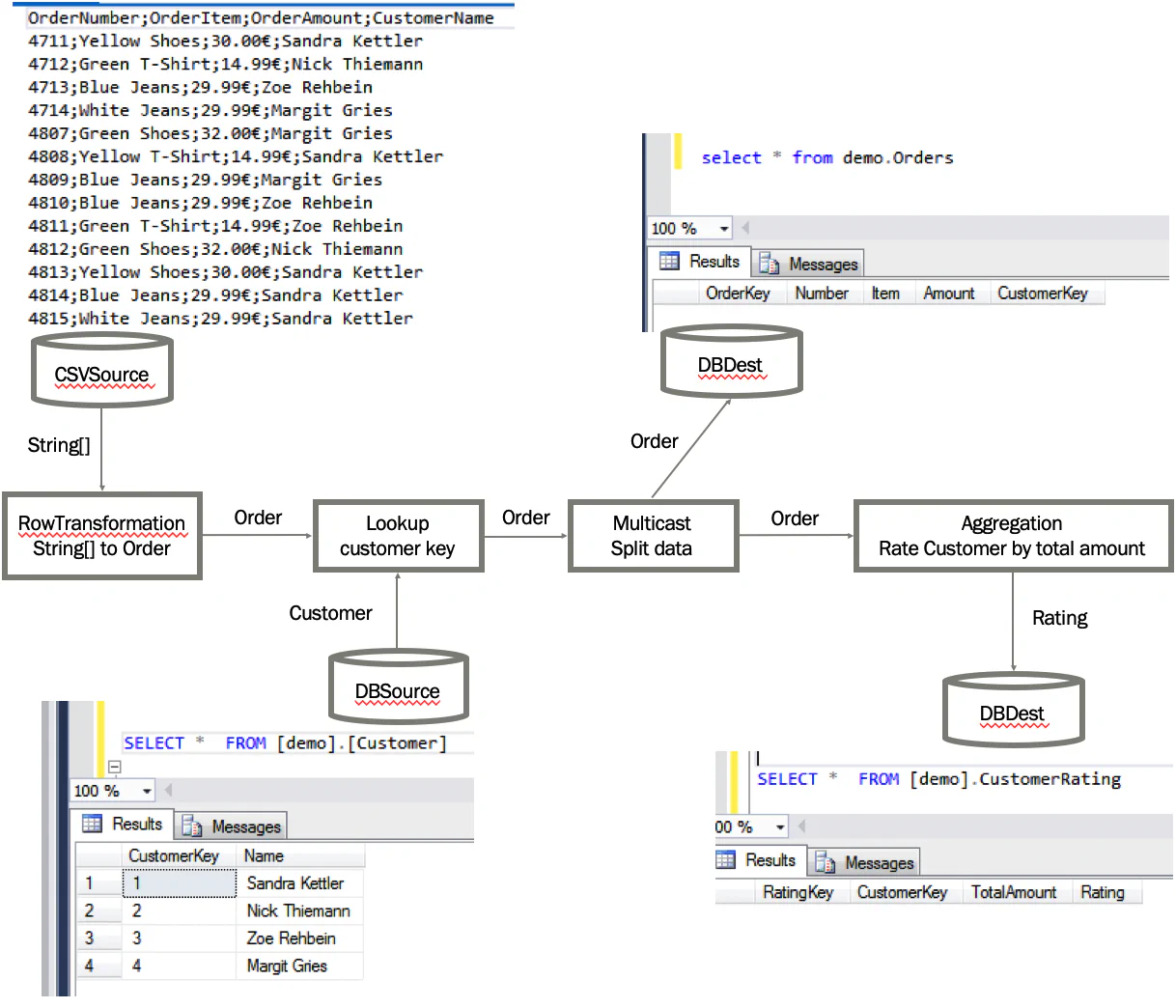
This example shows how to build a complete data flow pipeline using ETLBox. We read order data from a CSV file, transform it, enrich it with lookup values, aggregate results, and store everything in database tables.
To follow this demo, you’ll need access to a supported database server. While ETLBox supports various databases, this example was tested using SQL Server.
If you’re using Docker, you can spin up a SQL Server container with:
docker run -e "ACCEPT_EULA=Y" -e "SA_PASSWORD=YourStrong@Passw0rd" -p 1433:1433 --name localmssql -d mcr.microsoft.com/mssql/serverMake sure you’re logged into Docker (docker login) before running this. Start the container using:
docker start localmssqlThis gives you a SQL Server instance on port 1433. The default admin user is sa, with the password YourStrong@Passw0rd.
Before proceeding, create a database named demo.
Example connection string:
Data Source=.;Initial Catalog=demo;Integrated Security=false;User=sa;password=YourStrong@Passw0rd;Adjust the address as needed (e.g., replace . with your server IP if it’s running on another machine).
We need three tables:
orders to store the incoming order data,customer_rating to hold aggregated customer ratings,customer to map customer names to keys.You can create them manually, but here’s how to do it using ControlFlow tasks in ETLBox:
Settings.DefaultDbConnection = new SqlConnectionManager("Data Source=.;Initial Catalog=demo;Integrated Security=false;User=sa;password=YourStrong@Passw0rd");

TableDefinition OrderDataTableDef = new TableDefinition("orders",
    new List<TableColumn>() {
        new TableColumn("Key", "int",allowNulls: false, isPrimaryKey:true, isIdentity:true),
        new TableColumn("Number","nvarchar(100)", allowNulls: false),
        new TableColumn("Item","nvarchar(200)", allowNulls: false),
        new TableColumn("Amount","money", allowNulls: false),
        new TableColumn("CustomerKey","int", allowNulls: false)
});

TableDefinition CustomerTableDef = new TableDefinition("customer",
    new List<TableColumn>() {
        new TableColumn("Key", "int",allowNulls: false, isPrimaryKey:true, isIdentity:true),
        new TableColumn("Name","nvarchar(200)", allowNulls: false),
});

TableDefinition CustomerRatingTableDef = new TableDefinition("customer_rating",
    new List<TableColumn>() {
        new TableColumn("Key", "int",allowNulls: false, isPrimaryKey:true, isIdentity:true),
        new TableColumn("CustomerKey", "int",allowNulls: false),
        new TableColumn("TotalAmount","decimal(10,2)", allowNulls: false),
        new TableColumn("Rating","nvarchar(3)", allowNulls: false)
});

//Create demo tables & fill with demo data
OrderDataTableDef.CreateTable();
CustomerTableDef.CreateTable();
CustomerRatingTableDef.CreateTable();
SqlTask.ExecuteNonQuery("INSERT INTO customer values('Sandra Kettler')");
SqlTask.ExecuteNonQuery("INSERT INTO customer values('Nick Thiemann')");
SqlTask.ExecuteNonQuery("INSERT INTO customer values('Zoe Rehbein')");
SqlTask.ExecuteNonQuery("INSERT INTO customer values('Margit Gries')");These classes represent our data in the flow:
public class Order
{
    public string Number { get; set; }
    public string Item { get; set; }
    public int CustomerKey { get; set; }
    public string CustomerName { get; set; }
    public decimal Amount { get; set; }
}

public class Customer
{
    [RetrieveColumn(nameof(Order.CustomerKey)]
    public int Key { get; set; }
    [MatchColumn(nameof(Order.CustomerName)]
    public string Name { get; set; }
}

public class Rating
{
    [GroupColumn(nameof(Order.CustomerKey)]
    public int CustomerKey { get; set; }
    [AggregateColumn(nameof(Order.Amount), AggregationMethod.Sum)]
    public decimal TotalAmount { get; set; }

    [DbColumnMap("Rating")]
    public string RatingValue => TotalAmount > 50 ? "A" : "F";
}
Attributes such as [MatchColumn], [RetrieveColumn], [GroupColumn], [AggregateColumn], and [DbColumnMap] are used by ETLBox to control transformation behavior. For example:
[MatchColumn] marks keys used in lookup joins.[RetrieveColumn] specifies which fields to retrieve during a lookup.[GroupColumn] defines grouping keys for aggregation.[AggregateColumn] identifies values to aggregate (e.g., sum, count).[DbColumnMap("ColumnName")] maps a property to a different database column name.These attributes provide metadata for automated mapping during transformations.
Start by reading the CSV file:
//Read data from csv file
CsvSource sourceOrderData = new CsvSource("DemoData.csv");
sourceOrderData.Configuration.Delimiter = ";";
Example CSV:
OrderNumber;OrderItem;OrderAmount;CustomerName
4711;Yellow Shoes;30.00$;Sandra Kettler
4712;Green T-Shirt;14.99$;Nick Thiemann
4713;Blue Jeans;29.99$;Zoe Rehbein
4714;White Jeans;29.99$;Margit Gries
4807;Green Shoes;32.00$;Margit GriesUse a row transformation to convert each row into an Order object:
//Transform into Order object
RowTransformation<ExpandoObject, Order> transIntoObject = new RowTransformation<ExpandoObject, Order>(
    csvLine =>
    {
        dynamic order = csvLine as dynamic;
        return new Order()
        {
            //Header in Csv: OrderNumber;OrderItem;OrderAmount;CustomerName
            Number = order.OrderNumber,
            Item = order.OrderItem,
            Amount = decimal.Parse(order.OrderAmount.ToString().Replace("€",""), CultureInfo.GetCultureInfo("en-US")),
            CustomerName =  order.CustomerName
        };
    });
sourceOrderData.LinkTo(transIntoObject);
Normally, you could directly use CsvSource<Order> if your CSV is clean and matches your object structure exactly—meaning the column names align with property names and the data types are already correct. In this case, we introduce a transformation to manually clean the Amount field, for example, to remove invalid characters, handle missing values, or convert from string to a numeric type before further processing.
Here we join the order data with the customer dimension using a LookupTransformation<Order, Customer>. This adds the CustomerKey to each order based on a matching field like CustomerName. The [MatchColumn] and [RetrieveColumn] attributes guide the lookup by specifying which fields to match and which to retrieve. This step ensures each order is linked to the correct customer surrogate key.
 //Find corresponding customer id if customer exists in Customer table
DbSource<Customer> sourceCustomerData = new DbSource<Customer>("customer");
LookupTransformation<Order, Customer> lookupCustomerKey = new LookupTransformation<Order, Customer>(sourceCustomerData);
transIntoObject.LinkTo(lookupCustomerKey);
After an order row has passed through the lookup, the CustomerKey property is populated with the surrogate key from the customer table. This value comes from the column marked with [RetrieveColumn] in the Customer class.
Use a multicast to send the enriched data to two separate outputs:
//Split data
Multicast<Order> multiCast = new Multicast<Order>();
lookupCustomerKey.LinkTo(multiCast);
One branch stores the orders, the other calculates ratings.
Send the first output to the orders table:
//Store Order in Orders table
DbDestination<Order> destOrderTable = new DbDestination<Order>("orders");
multiCast.LinkTo(destOrderTable);The second output of the multicast is sent into an aggregation block to calculate a customer rating. Aggregation is a non-blocking transformation in ETLBox that supports basic functions like Sum, Min, Max, and Count, and it allows grouping by one or more fields.
In this case, we compute a simple rating based on the total order amount per customer. If the total exceeds 50, the customer gets a rating of "A"; otherwise, "F".
// Create rating for existing customers based on total order amount
Aggregation<Order, Rating> aggregation = new Aggregation<Order, Rating>();
multiCast.LinkTo(aggregation);
The logic is driven by attributes on the Rating class:
public class Rating
{
    [GroupColumn(nameof(Order.CustomerKey))]
    public int CustomerKey { get; set; }

    [AggregateColumn(nameof(Order.Amount), AggregationMethod.Sum)]
    public decimal TotalAmount { get; set; }

    [DbColumnMap("Rating")]
    public string RatingValue => TotalAmount > 50 ? "A" : "F";
}
The [GroupColumn] tells ETLBox to group orders by CustomerKey, and [AggregateColumn] defines that Amount should be summed for each group. The RatingValue is a calculated property that assigns the final rating based on the aggregated total.
Finally, store the rating results in customer_rating:
//Store the rating in the customer rating table
DbDestination<Rating> destRating = new DbDestination<Rating>("customer_rating");
aggregation.LinkTo(destRating);
Thanks to [DbColumnMap("Rating")], the RatingValue property maps to the correct column in the table.
Start the data flow execution:
Network.Execute(sourceOrderData);This triggers all linked transformations and destinations.
Once the pipeline finishes, inspect your database.
Orders in the orders table with corresponding customer keys:
| Key | Number | Item | Amount | CustomerKey |
|---|---|---|---|---|
| 1 | 4711 | Yellow Shoes | 30,00 | 1 |
| 2 | 4712 | Green T-Shirt | 14,99 | 2 |
| 3 | 4713 | Blue Jeans | 29,99 | 3 |
| 4 | 4714 | White Jeans | 29,99 | 4 |
| 5 | 4807 | Green Shoes | 32,00 | 4 |
| 6 | 4808 | Yellow T-Shirt | 14,99 | 1 |
| 7 | 4809 | Blue Jeans | 29,99 | 4 |
| 8 | 4810 | Blue Jeans | 29,99 | 3 |
| 9 | 4811 | Green T-Shirt | 14,99 | 3 |
| 10 | 4812 | Green Shoes | 32,00 | 2 |
| 11 | 4813 | Yellow Shoes | 30,00 | 1 |
| 12 | 4814 | Blue Jeans | 29,99 | 1 |
| 13 | 4815 | White Jeans | 29,99 | 1 |
Aggregated customer ratings in the customer_rating table:
| Key | CustomerKey | TotalAmount | Rating |
|---|---|---|---|
| 1 | 1 | 134.97 | A |
| 2 | 2 | 46.99 | F |
| 3 | 3 | 74.97 | A |
| 4 | 4 | 91.98 | A |